


Fix AI Presentation Slides with Too Much Text
Turn a dense room-selection slide into a checkable decision page. Keep the booking condition visible and move supporting detail into speaker notes.

AI turns your report into a slide, but the page now reads like the report. Shrinking the font makes the paragraph fit; it does not tell an audience which decision they need to make.
Before shortening the text, assign the slide one job. For a decision meeting, keep the alternatives, the facts that change the choice, and the remaining condition visible. Put explanation that can be spoken in the notes. Keep material needed for later verification in the source or an appendix.
Give the page a specific decision
This practice task asks an English-speaking team whether to pursue Room B for a 60-person workshop. The figures are invented. Room A holds 80 with its partition open, but only 40 for this booking because the partition must stay closed. It costs 80. Room B holds 70 and costs 110, within a room budget of 120; its availability is unconfirmed. Both prices include all required services in the same currency.
The initial page was deliberately written as a dense author example. Both images below were rendered from an actual editable presentation made for this article; they are not screenshots of a Copilot run or evidence of a particular model's behavior.
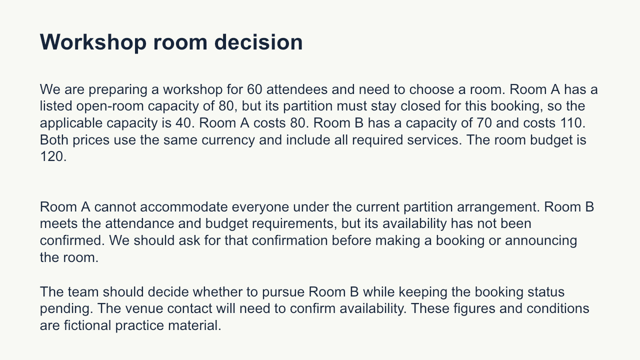
There is no clipping, and the facts are readable at full size. The problem is the job of the page: an audience must read several sentences to locate capacity, price, and the unresolved booking. If you speak at the same time, you are asking them to follow two versions of the explanation.
Ask AI to redistribute the information
Use the source facts and the original text, then request:
Revise this one slide for a team deciding whether to pursue Room B.
Keep on the slide: 60 attendees, each room's applicable capacity and cost,
budget 120, Room B availability unconfirmed, and the next decision.
Make the closed-partition condition visible beside Room A's capacity.
Move background explanation into speaker notes, preserving the open-room
capacity of 80 there. Do not say Room B is booked or available.
Return slide text and speaker notes separately. Do not shrink the font
to keep the original paragraphs. Preserve the factual source.
The edited reference page puts each room's relevant values together and keeps the unresolved condition in the title and beside Room B:
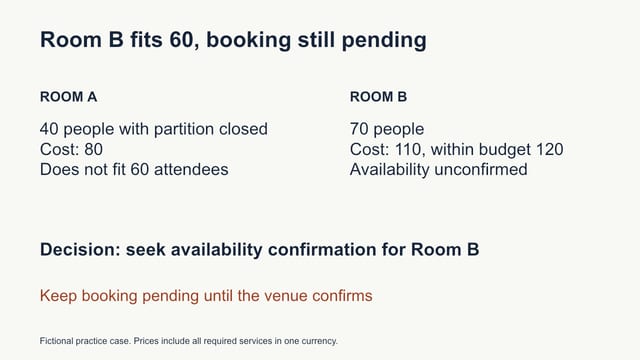
The next action is “seek availability confirmation for Room B.” It is more useful than “choose Room B” because the source does not yet establish a bookable room. Removing the word “unconfirmed” would make the page shorter and the decision less accurate.
The reference speaker notes retain the open-room capacity of 80, explain why 40 applies to this booking, and preserve that both prices cover the required services in one currency. The presenter can explain that context without projecting a second copy of the whole paragraph.
Decide which details must stay visible
| Information | Where it belongs in this example |
|---|---|
| Applicable capacity, cost, and budget | Main slide, because they change the choice |
| Closed partition and unconfirmed availability | Main slide, next to the affected value or action |
| Why the brochure also says 80 | Speaker notes, with the original source available |
| Complete venue terms in a real decision | Source or appendix for verification |
Microsoft's presentation guidance recommends minimizing slide text and making it readable for the room. That supports editing for an audience; it does not establish a universal word limit. A training handout, a live talk, and a detailed document deck may need different amounts of text.
Check the exported page, then check the meaning
Open the actual export and view it at the size your audience will see. Check wrapping, clipping, contrast, and whether you can identify the requested decision quickly. Inspect the editable file too: text that looks correct in a PNG may have been flattened into an image in a different workflow. Confirm that the title and conditions can still be changed where editability matters.
Then compare every number and condition with the source. Room A's applicable capacity is 40, Room B's is 70, attendance is 60, costs are 80 and 110, and budget is 120. The booking remains pending. A clearer layout passes only when it preserves those facts.
For a slide with too many distinct decisions, split it by decision rather than squeezing everything into one page. For this case, one page is sufficient. Keep the source explanation and notes with the deck so the shorter presentation does not become the only surviving version of the evidence.


