


AI Image Generation vs Editing When You Already Have a Photo
Compare an actual recolor edit with a new generation of the same described pouch. Choose by the details you need to retain, then inspect the result.

You have a pouch photograph and want to try a blue colorway. A fresh image of “a blue pouch” can look convincing while changing the zipper, shape, or front patch. That matters if the photograph is supposed to represent the same object.
Choose the workflow by what must survive. Fresh generation suits a new scene or concept where a new object is acceptable. Editing starts from an existing image and asks for a specified change. It gives you a useful starting point for continuity, but the output still needs inspection.
One synthetic photo, two different requests
We made this unbranded practice photograph with the built-in image generator on October 13, 2026. It depicts a fictional product, not a real item for sale. The source shows an olive-green canvas pouch, a mustard-yellow loop on the left, a black zipper, and a cream front patch with three dark horizontal stitches.
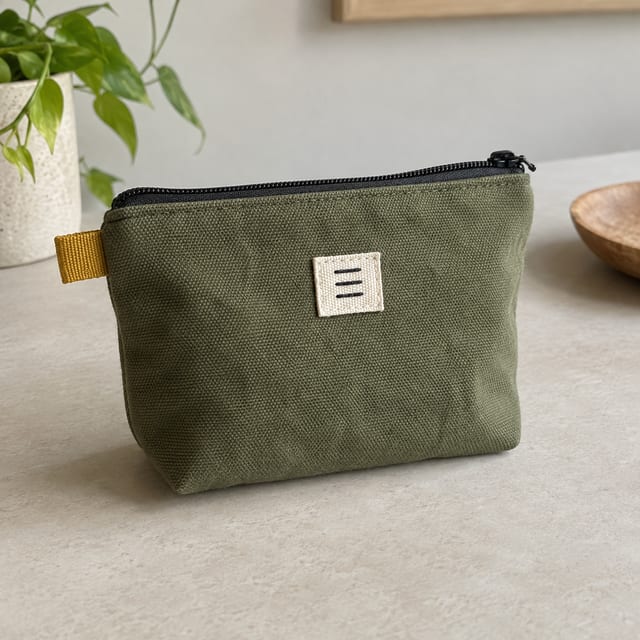
The task was to change the canvas body to dusty blue while retaining the object and photograph. We ran one edit with this source image and one fresh generation without an image input. These are three actual generated files, not a simulated comparison or a survey of models.
For the edit, the request specified:
Change only the olive-green canvas body to muted dusty blue.
Preserve the pouch dimensions, folds, black zipper, mustard-yellow
loop on the left, cream patch with exactly three dark horizontal stitches,
camera angle, beige tabletop, plant, and lighting.
Do not add letters or new objects.
For fresh generation, we described a dusty-blue pouch with those features, on a beige tabletop with a plant behind it. We supplied no reference photo. The text gave the new image a subject and setting, but not the original photograph's exact geometry.
Compare the preserved relationships
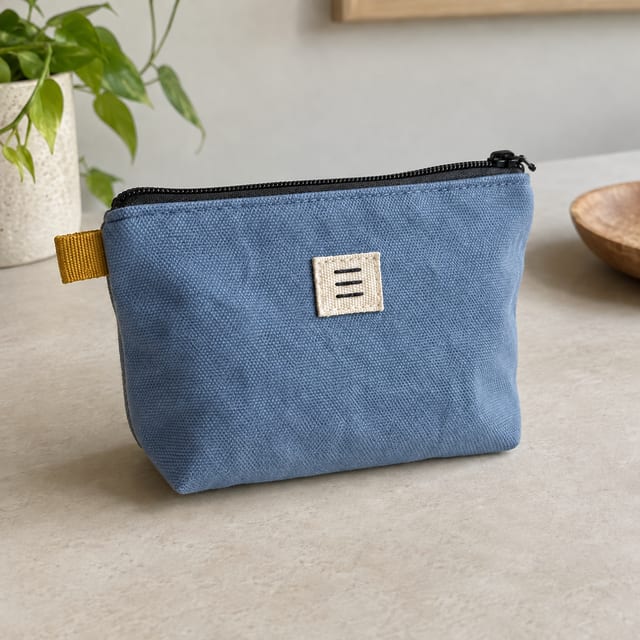
Edit using the source photograph:
Fresh generation from text:
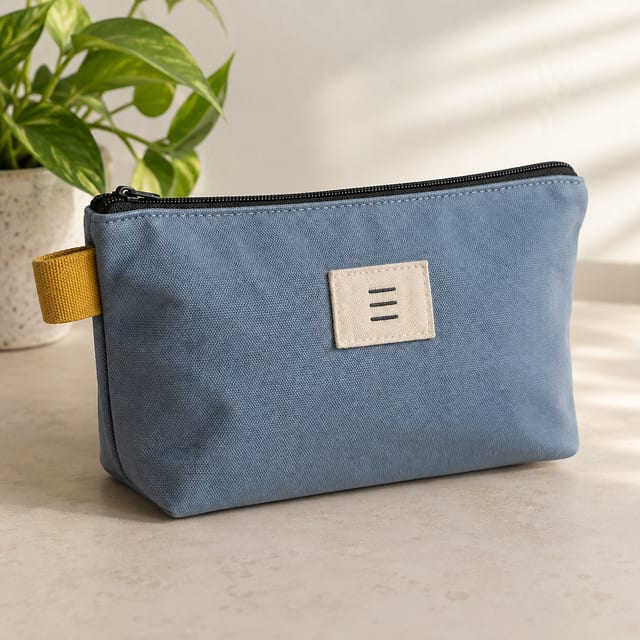
In this run, the edit retains the source's overall outline, patch placement, loop, and background arrangement more closely. The fresh generation also includes three stitches, but its patch is wider and its zipper pull appears on the left instead of the source's right. The plant and lighting arrangement change as well.
Those are observations of these outputs. They do not prove that editing always succeeds or generation always fails. We have not established pixel-for-pixel preservation in the edit. A commercial product photograph would need closer checks against the real item, including seams, color accuracy, material, and dimensions.
State the parts that matter before choosing a tool
| Required outcome | Useful starting workflow |
|---|---|
| Explore a new pouch concept; shape may change | Fresh generation, then choose and refine the concept |
| Change the color in this existing photograph | Editing with the source and a narrow change request |
| Keep every product pixel while changing the background | A workflow that explicitly protects the subject, followed by mask and edge inspection |
| Show the exact product in a new scene | Source-based editing or compositing, with product-detail checks before use |
OpenAI's image-generation documentation describes generation and editing as different operations and notes that some controls depend on the model. Check the actual tool rather than assuming that every app's “reference image” control guarantees the same preservation.
For your own photo, write a short keep/change list: body color changes; zipper direction, logo, stitching, outline, and setting stay. If a logo must remain exact, compare it with the original at full size. Do not accept a plausible substitute because it matches the general style.
Save the original separately and view before and after side by side. Check the required change first, then every named invariant. If the edit changes an important detail, correct that defect or choose a method that protects the original subject more directly. The background-editing guide explains why protecting the subject matters when only the surroundings should change.
For a real product listing, a generated color experiment is still an experiment. Verify that the pictured colorway actually exists before using it to describe something a customer can buy.


